
功能简介
机器人出现在意想不到的地方,或者机器人不见了,FieldBots 在这两种情况下都能提供帮助:"Locate" 会发出声音信号,便于找到附近的机器人;"Mark as Missing" 则用于保护已丢失的机器人,禁止其使用并保护其数据。
适用人群
在寻找躲在角落里的机器人的现场团队;在机器人没有回来时需要采取行动的管理员。
操作步骤
定位机器人
- 打开机器人页面并点击 "More"。
- 选择 "Locate"。

- FieldBots 发送命令,您会看到 "The action will be performed shortly",机器人在您走近时发出声音信号。
- 没有声音?机器人的声音反馈可能被静音:此时 FieldBots 会拒绝定位,并提示 "Acoustic Feedback is silenced. Please change the team setting first." 请更改团队设置 "Acoustic Feedback" 后再试。
将机器人标记为丢失或被盗
- 打开机器人页面,点击 "More" 并选择 "Mark as Missing"。(该条目适用于尚未被标记为丢失的实体机器人。)
- 对话框 "Mark Robot as Missing or Stolen" 会打开并说明将发生的事情:
- 团队负责人会看到:"When you mark this robot as missing or stolen, we will disable it and register the serial number for separate monitoring when your robot returns online."
- 没有团队负责人权限的团队成员会看到:"You can ask one of your managers to mark this robot as missing or stolen. We will then disable it and register the serial number for separate monitoring when your robot returns online."
- 在其下方,对话框列出了相关步骤,视机器人而定,可能包括:
- "we will wipe the robot for data security",
- "make sure the robot is blocked from usage within FieldBots",
- "tell the user that the robot is marked missing or stolen and give a chance to give it back",
- "record the location of the robot to support the local authorities"。
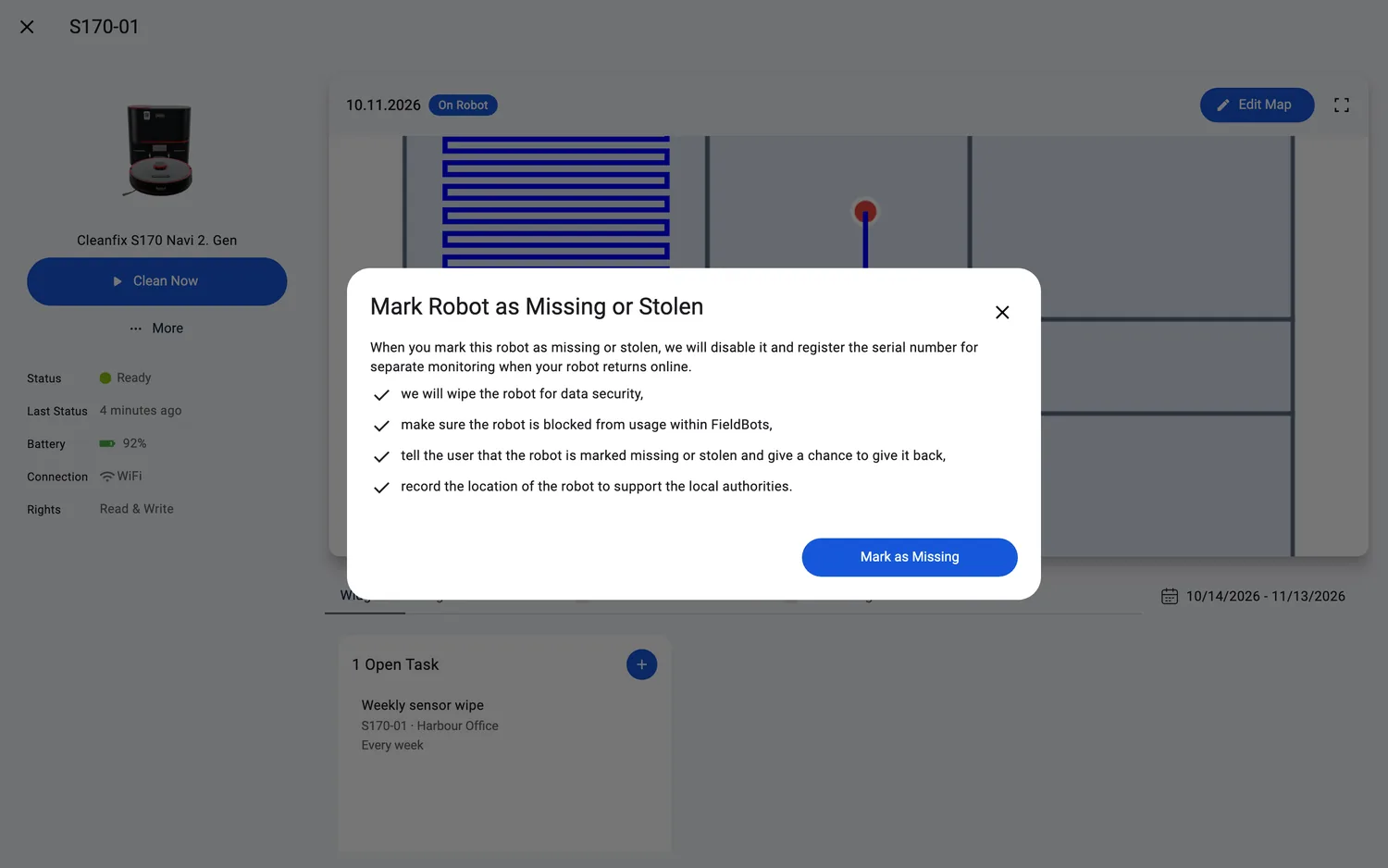
- 点击 "Mark as Missing" 确认,确认按钮仅对团队负责人(管理员)显示。
- 机器人的状态变为 "Missing or Stolen",即使机器人离线也会保持该状态。
- 此后,机器人会持续播放提示音,所有打开它的人都会看到说明:"This robot was marked missing or stolen and can not be used now. For privacy reasons, all data has been wiped. A constant jingle will be played. Your location and user account has been recorded to support local authorities.",以及 "Please contact Support to help give the robot back to its rightful owner."
网页端 / 移动端:两种流程在网页端和应用中完全相同;在手机上,这些操作显示在相同的菜单和对话框中。
支持的机器人型号
标记为丢失/被盗:全部 52 个机器人。通过声音信号查找(Locate):
Cleanfix
S170 Navi 1. GenS170 Navi 2. Gen
GeniusⓇ
Swift
Robot Sweeper
Robot Sweeper 8
i-team
co-botic 1700co-botic 1700 (2025)co-botic 1900
仅对与智能手机配对的 FieldBots 原生微型机器人,才会记录被盗机器人的 GPS 位置。
说明与限制
- 丢失机器人的 GPS 位置会被记录下来以支持当地执法部门,但应用不会显示该位置:没有地图标记或坐标视图。
- 将机器人标记为丢失是严肃的操作:由团队负责人(管理员)确认,而恢复丢失的机器人由 FieldBots 团队处理,如果机器人找回,请联系 "Support"。
- "Locate" 和 "Mark as Missing" 需要写入权限,只读成员看不到这些操作。
- 机器人的时间线会记录:"marked robot as missing or stolen",找回时则记录 "marked robot as recovered"。
- 对于被卡住的 iRobot Roomba,机器人的状态说明也提到了同样的方法:使用地图和定位声音来找到并解救设备。